


Picking up someone from the airport, or worried about a delay? You can track a flight by flight number online in under a minute, and you don’t need to pay or create an account. This guide shows the easiest ways to do it, what the status labels mean, and what to try if your flight doesn’t show up.
What You Need Before You Start
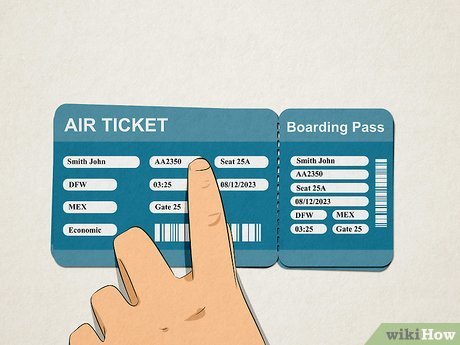
- The flight number. It is the airline code plus the number on the ticket, such as PK 304 or EK 612.
- The travel date. Airlines reuse the same flight number every day, so the date matters.
- A phone or computer with internet.
Method 1: Track a Flight on Flightradar24
Flightradar24 shows where a plane is right now on a live map. The app and website are free to use, and paid plans only add extras like longer flight history.
- Open the Flightradar24 website or app.
- Type your flight number into the search bar at the top. You can also search by aircraft registration or call sign.
- Pick your flight from the results.
- Tap the flight to follow it live if it is in the air, or to see its recent and scheduled flights if it is not.
Method 2: Track a Flight on FlightAware
FlightAware is strong on schedule details. It shows planned and actual departure times, the estimated arrival time while the plane is in the air, and the flight’s history over recent days. It also has a free app with push alerts.
- Open the FlightAware website or app.
- Enter the flight number in the search box. You can also search by route, airline, or airport.
- Open the right flight and date from the list.
- Turn on an alert if you want a notification when the status changes.
Method 3: Use the Airline’s Own Website
Most airlines have a flight status page. For example, on the PIA website you open the flight status section, enter the flight number, choose the date, and search. You can also search by route if you do not know the flight number. Menu names can change when a website is redesigned, so look for “Flight Status” on the homepage.
The airline’s page is useful for gate changes, cancellations, and official delay notices, which a map tracker may not show.
Method 4: Check the Airport’s Arrivals Board
Many airports publish live arrivals and departures online. Islamabad International Airport, for example, has a Flight Inquiry page that lists flights with their expected time and status. This is handy when you are driving to pick someone up and need the latest landing time.
Which Tool Should You Use?
| Tool | Best For | Cost | Search By |
|---|---|---|---|
| Flightradar24 | Seeing the plane’s live position on a map | Free, with optional paid plans | Flight number, registration, call sign |
| FlightAware | Schedule details, estimated arrival, and alerts | Free app and website | Flight number, route, airline, airport |
| Airline website | Official delays, cancellations, and gate changes | Free | Flight number or route |
| Airport arrivals board | Latest landing time for pickups | Free | Browse the list of flights |
What the Status Labels Mean
- Scheduled or Expected: the flight has not left yet, or has not arrived yet.
- On Time: the flight is running to schedule.
- Delayed: the new departure or arrival time is later than planned.
- En Route: the plane is in the air.
- Landed: the plane has arrived.
- Cancelled: the flight is not operating. Contact the airline.
Smart Tips for Better Tracking
- Check the incoming plane. The aircraft for your flight often arrives from another city first. If it has not left that city, your flight will probably be late.
- Try the airline’s tracker code. Booking sites show codes like PK 204, while some trackers list the same flight as PIA204. If one format fails, try the other.
- Set an alert. Apps like FlightAware can notify you when the status changes, so you do not need to keep refreshing.
- Share the link. Send the tracking page to family members who are waiting at the airport.
If You Cannot Find Your Flight
- Check the flight number for typos, and try it with and without a space.
- Make sure the date is correct, especially for overnight flights.
- Try the other airline code format, such as PK 204 and PIA204.
- Search by route instead of by number.
- Remember that a plane may not show on the map before takeoff or in places with weak signal coverage. The schedule details can still appear.
- If nothing works, check the airline’s own website or call its helpline.
Frequently Asked Questions
Can I track a flight without an account?
Yes. Flightradar24 and FlightAware both let you look up a flight by number without signing up. An account is only needed for extras such as saved alerts.
Is flight tracking free?
Basic tracking is free on both Flightradar24 and FlightAware, as well as on airline and airport websites. Paid plans add things like longer history.
How early can I track a flight?
You can usually see the schedule before the flight departs. The live map position appears once the plane is in the air.
What is the difference between a flight number and a booking reference?
A flight number, like PK 304, identifies the flight. A booking reference (PNR) identifies your ticket. Trackers use the flight number, not the booking reference.
Are tracker times exactly the same as the airline’s?
Not always. For gate changes, cancellations, and official delay notices, the airline’s own page is the safest source.
Tracking a flight by flight number takes just a few taps. Use a live tracker for the plane’s position, and the airline’s website for official updates, and you will always know when your flight is due to land.
