


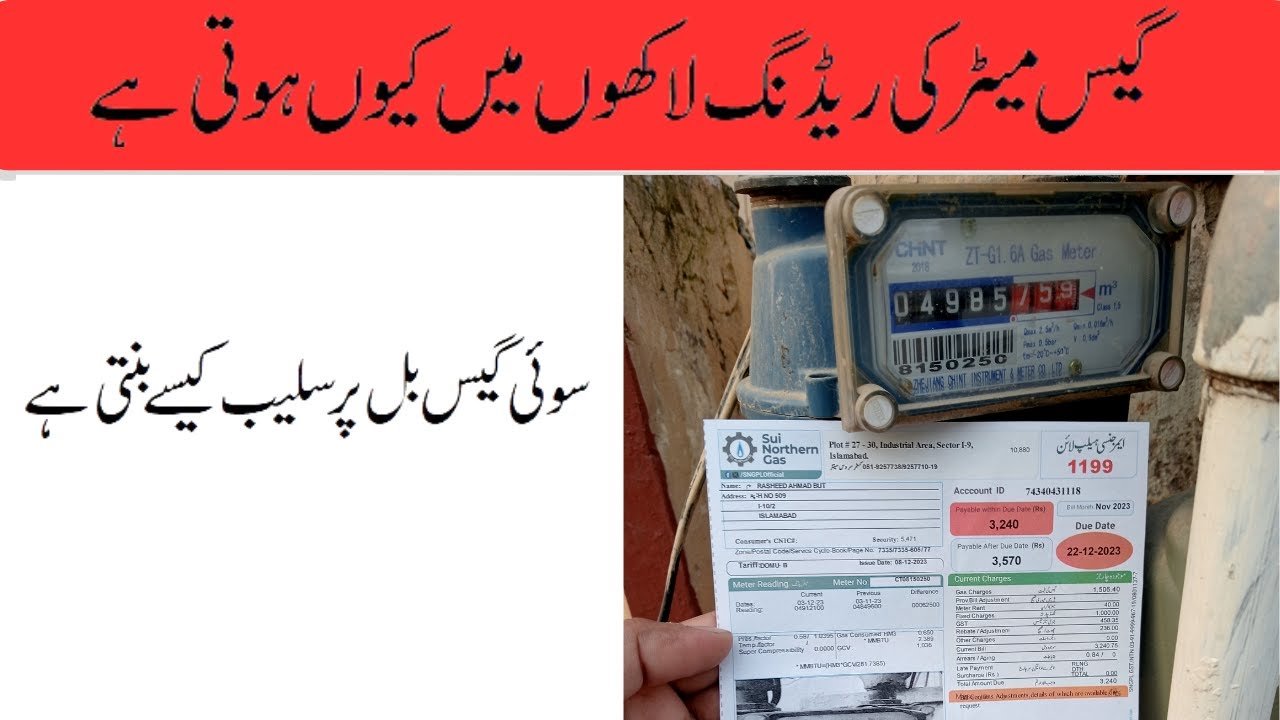
Want to know if your gas bill matches your meter? In Pakistan, you can see the meter reading used for your bill online or in the official apps of the two gas companies, and then compare it with the real meter at home. This guide explains where to look, how to read the numbers and what to do if they do not match.
First, Know Your Gas Company
- SNGPL (Sui Northern Gas Pipelines Limited) serves Punjab, Khyber Pakhtunkhwa and parts of northern Pakistan.
- SSGC (Sui Southern Gas Company) serves Sindh and Balochistan.
Your bill shows the company name. Use that company’s official website or app.
An Important Point About “Online Meter Reading”
In most cases, gas company staff read your meter and the reading appears on your bill. So “checking the meter reading online” usually means looking at your bill online, which shows the previous reading and the current reading. Only SSGC’s app is described as letting customers record their own units. I did not find a customer self-reading option in SNGPL’s app.
Option 1: SNGPL Customers
SNGPL has an app for consumers called SNGPL ConnectOn on Google Play. Its listing says it is published by Sui Northern Gas Pipelines Limited. According to the listing, you can:
- View and download bills, and see yearly consumption and billing details.
- Pay bills online.
- Register complaints and check complaint history.
- Register for e-bills by email and SMS.
- Add more than one account ID.
The listing does not mention a meter reading feature. Reviews on the page include complaints about bill calculation errors, so always check your bill against your meter.
Do not confuse it with an app called “SNGPL Consumer Information.” Its listing says it is for SNGPL employees only.
Option 2: SSGC Customers
SSGC has an app called SSGC Customer Connect from Sui Southern Gas Company. A store listing says it lets you:
- See your current bill, amount due and due date, and past bills.
- Record your gas units and see your usage for past and current months.
- File complaints about service or billing.
The page I read is an independent summary of the store listing and may not be current. Its rating was low at 1.9 out of 5, so features may not always work smoothly.
Using the Company Websites
Both companies have official websites, sngpl.com.pk and ssgc.com.pk. They have bill viewing pages, and you need your 10-digit consumer reference number, which is printed on your bill. I could not open these sites to check the current steps, and an older guide from 2020 gave different page addresses. Type the company’s website address yourself and look for the bill or consumer section. Do not use look-alike “duplicate bill” sites. Several private sites offer gas bill checks and say they are not linked to SNGPL or SSGC.
How to Read the Meter Section of Your Bill
- Previous reading: the reading at the last billing date.
- Current reading: the reading used for this bill.
- Consumption: the current reading minus the previous reading.
- Reading date: when the reading was taken, if shown.
How to Check Your Real Meter
- Go to your gas meter and read the main digits carefully.
- Compare them with the current reading on your bill.
- The meter should normally show the same number or a higher one than the bill’s current reading, because gas keeps being used after the bill reading was taken.
- If the bill’s reading is much higher than your meter, take a clear photo of the meter and keep it as proof.
This tip comes from a private guide and is not an official rule, but it is a sensible check.
If the Reading Looks Wrong
- Take a dated photo of your meter.
- Keep a copy of the bill.
- Make a complaint through the company app or through the official website or office. Use the contact details printed on your bill.
- Ask for the bill to be corrected before you pay a disputed amount, and keep any complaint number.
Frequently Asked Questions
Can I check my meter reading online?
You can see the readings on your bill through the company app or website. SSGC’s app also lets customers record their units.
What number do I need?
Your consumer reference number from your bill.
Is there an official SNGPL app?
Yes, SNGPL ConnectOn, published by Sui Northern Gas Pipelines Limited.
Which company is mine?
SNGPL for most of Punjab and Khyber Pakhtunkhwa, and SSGC for Sindh and Balochistan. Check your bill.
What if my bill reading is too high?
Photograph your meter and make a complaint through the official channels.
Check your bill against your meter every month. It takes a few minutes and can help you spot a mistake early.
