


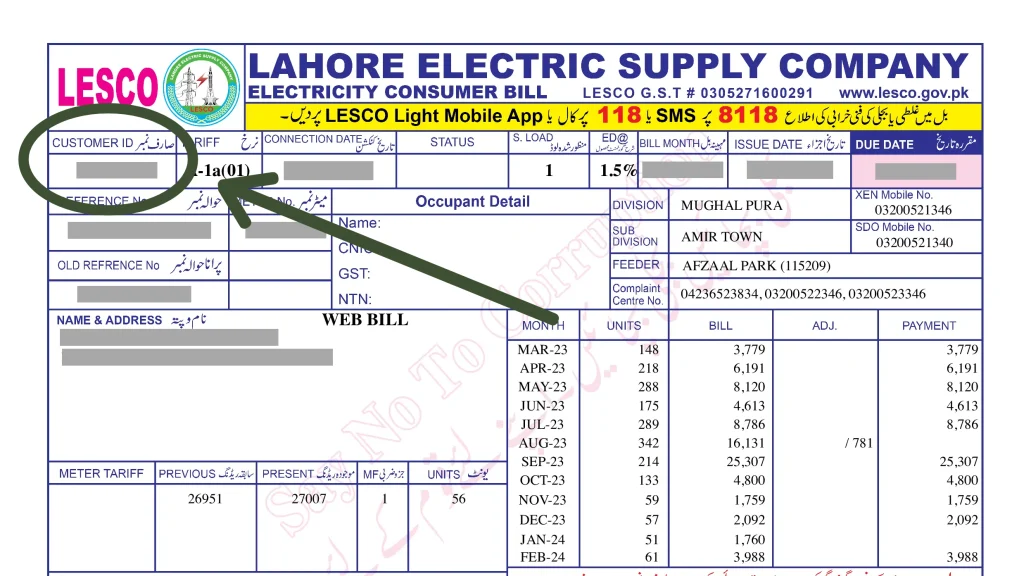
Lahore’s electricity provider serves more than 6.4 million consumers across the city and nearby districts, and checking your bill doesn’t require a single trip to a LESCO office. This guide shows you exactly how to check LESCO bill online in under a minute, using only your reference number or Customer ID — no account, login, or fee required.
Which Areas Does LESCO Cover?
LESCO, short for Lahore Electric Supply Company, is a government-owned utility that distributes electricity across Lahore, Okara, Sheikhupura, Nankana Sahib, and Kasur. Established in 1998, LESCO now manages more than 120 grid stations and 48,000 kilometers of power lines across the region. If your area falls within these districts, LESCO — not a different DISCO — is your electricity provider.
What You Need Before You Start
To check your bill, you’ll need one of two identifiers, both printed on any previous LESCO bill:
- Reference Number: A 14-digit number followed by a letter — “U” for urban connections or “R” for rural connections (for example, 12 12345 1234567U)
- Customer ID: A separate, shorter identifier also printed on your bill
You only need one of the two, not both. Both are usually found in the top-left corner of your printed bill.
How to Check Your LESCO Bill Online: Step-by-Step
Official website: https://www.lesco.gov.pk
Alternative official portal: https://bill.pitc.com.pk (powers duplicate bill generation for all of Pakistan’s DISCOs, including LESCO)
- Open your browser on any device — mobile, tablet, or desktop.
- Visit the official LESCO website or the PITC portal linked above. Both draw from the same official billing data.
- Choose whether to search by Reference Number or Customer ID.
- Type your number carefully, with no spaces or hyphens. A single incorrect digit will return no results.
- Click “Check Bill” or “Generate Bill” to pull your latest bill record.
- Review your bill amount, due date, and consumption details on screen.
- Use the print or download option to save a PDF copy for your records or for payment purposes.
What If You Don’t Have Your Reference Number?
If you’ve misplaced your paper bill, LESCO’s official website also allows CNIC-based lookup: select the CNIC registration option, enter your CNIC number, and the system will display your reference number and Customer ID, which you can then use for future bill checks. It’s worth saving this number in your phone contacts afterward — it’s shorter and easier to reuse than digging out an old paper bill every month.
Other Ways to Check or Pay Your LESCO Bill
- Bank apps: HBL, UBL, Meezan Bank, and other major banks allow LESCO bill inquiry and payment by entering your reference number under their “Utility Bills” section.
- JazzCash and Easypaisa: Both mobile wallets support checking and paying LESCO bills in a single session.
- LESCO customer helpline: Call 118 for billing inquiries, or reach LESCO’s complaint system by SMS at 8118 if you need help beyond a simple bill check.
A Word of Caution on Third-Party Bill Sites
Searching for “LESCO bill check” online brings up a large number of third-party websites offering the same service. Several of these explicitly state they are not affiliated with LESCO or any government authority, and exist purely as informational tools. While many of these are harmless, it’s safer to use LESCO’s official website or the PITC portal directly, especially since you’re entering personal billing information. If you do use a third-party site, avoid entering any information beyond your reference number, and never share your CNIC or banking details on a site that isn’t LESCO’s official domain or a recognized bank/wallet app.
Frequently Asked Questions
Is checking my LESCO bill online free?
Yes. Checking your bill through LESCO’s official website or the PITC portal is completely free and requires no account or login.
What’s the difference between Reference Number and Customer ID?
Both are unique identifiers tied to your electricity connection, printed on your bill. Either one alone is enough to check your bill — you don’t need to provide both.
Can I check my LESCO bill without a CNIC?
Yes, if you already have your Reference Number or Customer ID from a previous bill. CNIC lookup is only needed as a backup method if you’ve lost your bill and don’t have either number saved.
How do I avoid a late payment surcharge?
Check your bill a few days before the due date rather than waiting for the paper copy to arrive, since LESCO applies a late payment surcharge automatically if payment isn’t made on time.
With your Reference Number or Customer ID on hand, checking your LESCO bill takes less than a minute through the official website — no queues, no paperwork, and no need to wait for the postman.
