

Running out of M-Tag balance at a toll plaza can mean a delay, a penalty, or an embarrassing stop in a long queue. The good news is that you can check M-Tag balance in under a minute, from your phone, and recharge it just as quickly. This guide explains every method, the numbers to use, and how to avoid problems before your next motorway trip.
What Is the M-Tag?
M-Tag is the electronic toll system on Pakistan’s motorways, run under the National Highway Authority (NHA) with One Network. It uses an RFID sticker on your windscreen. When you drive through a toll plaza, the system reads the tag and deducts the toll from your prepaid balance.
Because the system is prepaid, you need enough balance before every trip. Reports for 2026 say motorway toll plazas have moved to cashless collection, and low balance can attract an extra charge. Therefore, make a habit of checking your balance before you leave.
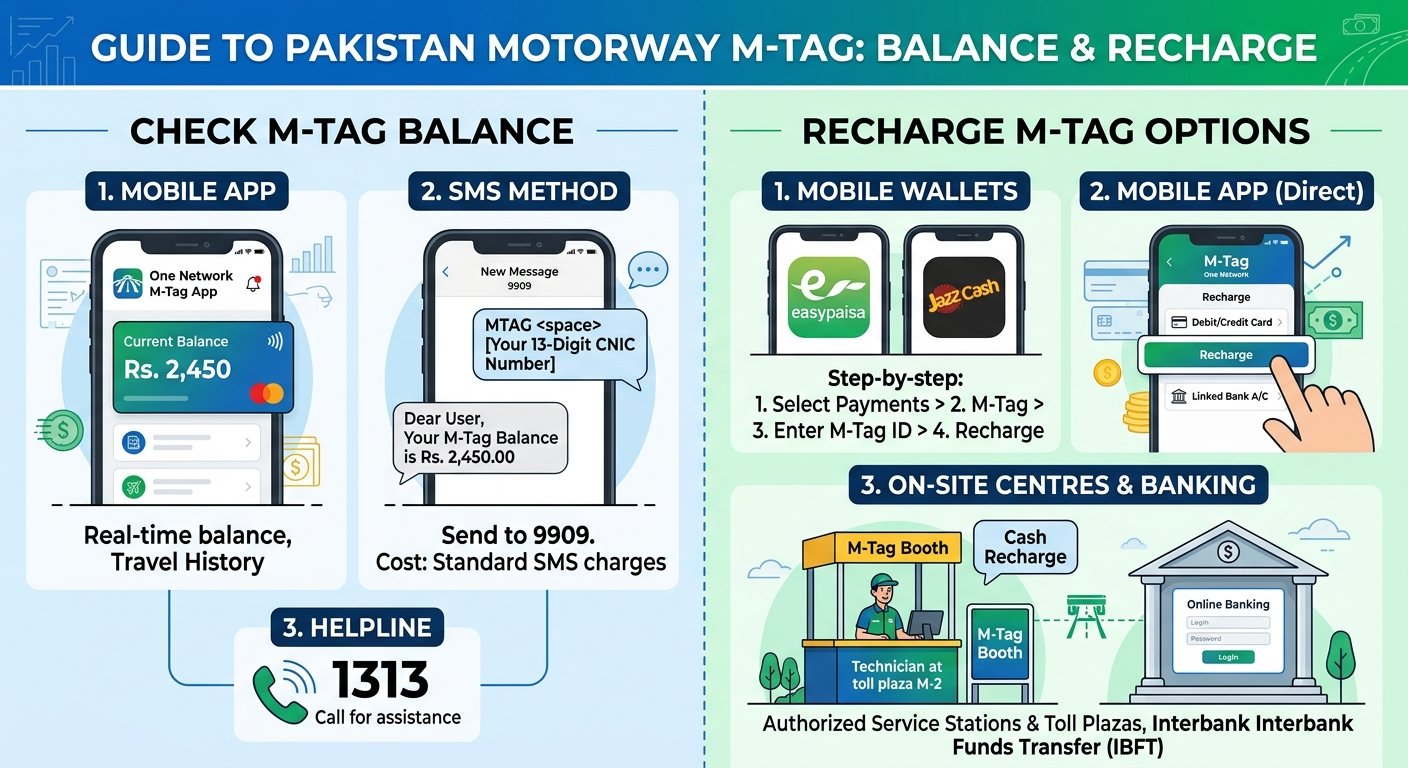
Ways to Check M-Tag Balance
| Method | What You Need | Good For |
|---|---|---|
| One Network app | Smartphone, internet, registered account | Balance, trip history, and recharge in one place |
| SMS to 9909 | Any mobile phone, M-Tag ID or CNIC | Quick check without internet |
| JazzCash or Easypaisa | Wallet app and 8-digit M-Tag ID | Checking and recharging together |
| Helpline 1313 | Any phone, vehicle or tag details | Help if the other methods fail |
Check M-Tag Balance by SMS
SMS works on any phone and does not need internet. Guides published for the M-Tag system describe this format:
- Open a new SMS on your phone.
- Type Balance, a space, and your 8-digit M-Tag ID.
- Send it to 9909.
- Wait for the reply with your balance.
Normal SMS charges apply. Some recent guides also say you can send Mtag, a space, and your CNIC number to 9909. These guides describe the reply as your tag ID and status, and some say it also shows the balance. If one format does not work for you, try the other, or call 1313.
How to Find Your M-Tag ID
You need the 8-digit ID for most recharge methods. You can find it in these ways:
- Send Mtag and your CNIC number by SMS to 9909.
- Open the One Network app, where the ID appears on your dashboard.
- Call 1313 and give your vehicle details.
- Check the paperwork you received when you got the tag.
If you bought a used car, the tag may belong to the previous owner. Check the ID against your CNIC before you recharge it.
Check Balance Using the One Network App
- Download the official One Network app from the Play Store or the App Store.
- Register with your mobile number and CNIC.
- Open the dashboard to see your tag ID and balance.
- Use the history section to see your toll transactions.
The app also has a toll calculator, so you can estimate the cost of a route before you travel. Install the app only from the official store listing, because fake apps exist.
Check Balance With JazzCash or Easypaisa
The wallet apps work for both checks and recharges. In JazzCash, open the app, tap View All, choose M-Tag Recharge, and enter your 8-digit M-Tag ID. The balance appears before you pay. In Easypaisa, look under Payments or Bill Payment and choose the M-Tag option.
M-Tag Recharge Options
You can top up your tag in several ways:
- One Network app: pay with a debit or credit card.
- JazzCash: use your wallet balance or a linked bank account.
- Easypaisa: pay through the wallet or a linked account.
- UPaisa and bank apps: available through bill payment in many apps.
- M-Tag counters: visit a counter at a toll plaza or service area and pay with your ID details.
- Helpline: call 1313 for help if an online recharge fails.
Some guides say wallet recharges are free of extra charges, while others mention small fees. Check the amount shown before you confirm the payment.
Step-by-Step: Recharge Through a Wallet App
- Open JazzCash, Easypaisa, or your bank app.
- Select the M-Tag or motorway recharge option.
- Enter your 8-digit M-Tag ID.
- Enter the amount you want to add.
- Confirm the details and pay.
- Wait for the SMS or app confirmation, then check your balance again.
What Happens If Your Balance Is Low?
If the balance is too low, the barrier may not open, or a penalty may be added to your account. Reports on the penalty amount differ. Some mention an extra 25 percent charge, and others mention 50 percent. Because the figures differ, confirm the current rule with the NHA or the 1313 helpline.
The simplest solution is prevention. Top up before long trips, and keep a buffer for the full return journey.
Tips to Avoid Problems
- Check your balance the night before a trip, not at the toll plaza.
- Calculate the toll for your route with the app’s toll calculator.
- Keep the tag fixed on the windscreen and do not remove it, because a moved tag may stop working.
- Use only official channels. Do not share your CNIC, OTP, or card details with callers.
- Update your registered mobile number if you change it.
- Save the 1313 helpline number in your phone.
Frequently Asked Questions
How do I check my M-Tag balance?
Use the One Network app, send an SMS to 9909, use JazzCash or Easypaisa, or call the 1313 helpline.
What is the M-Tag helpline number?
The helpline is 1313.
How do I find my M-Tag ID?
Send Mtag and your CNIC to 9909, open the One Network app, or call 1313.
Can I recharge my M-Tag online?
Yes. You can recharge through the One Network app, JazzCash, Easypaisa, UPaisa, and many bank apps.
What if I enter a toll plaza with low balance?
You may face a delay or an extra charge. Confirm the current penalty with the NHA or the helpline.
Conclusion
To check M-Tag balance, use the One Network app or an SMS to 9909, and recharge through your wallet or bank app. Keep your 8-digit ID handy, check before every long trip, and call 1313 if anything fails. Rules, SMS formats, and penalties can change, so confirm the latest details with the NHA or One Network. For more guides on daily services, keep following Pakistan Post. You can also visit the NHA website for official notices.
