


An unregistered phone in Pakistan doesn’t stay usable for long — PTA blocks non-compliant devices from all local networks within 60 days of first use. Whether you just bought a new phone, imported one from abroad, or picked one up secondhand, here’s exactly how to check PTA mobile registration status in under a minute, completely free.
What You Need First: Your IMEI Number
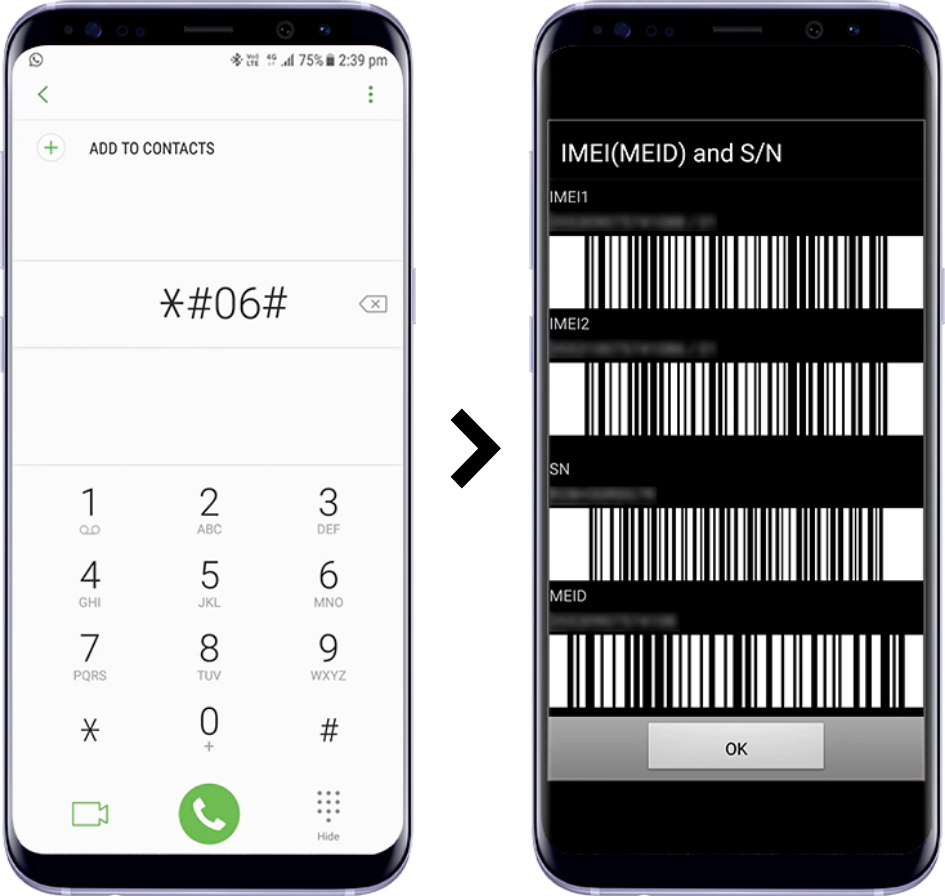
Every mobile phone has a unique 15-digit IMEI (International Mobile Equipment Identity) number, and dual-SIM phones have two. To find yours:
- Open your phone’s dialer app.
- Dial *#06#.
- Your IMEI number(s) will appear instantly on screen. Note down both numbers if you have a dual-SIM device.
Method 1: SMS Check (Fastest)
- Open your messaging app and compose a new text message.
- Type your 15-digit IMEI number exactly as shown, with no spaces, dashes, or other text.
- Send it to 8484.
- You’ll receive a reply within seconds to a few minutes showing your device’s current status.
A small SMS charge applies (approximately Rs. 2–3 including tax). If you don’t get a reply within two hours, it’s fine to resend once — but repeatedly sending the same IMEI won’t speed things up and may get flagged as spam.
Method 2: USSD Code (No SMS Charge)
Dial *8484# directly from your phone’s dialer for an instant on-screen response, without the small SMS fee.
Method 3: Official DIRBS Website
Official website: https://dirbs.pta.gov.pk
- Visit the official DIRBS portal linked above.
- Enter your 15-digit IMEI number in the search field.
- Click “Check” to view your device’s compliance status on screen.
Method 4: DIRBS Mobile App
PTA also offers an official DIRBS DVS app, available on the Google Play Store and Apple App Store, which lets you scan your device or manually enter your IMEI for an instant result — useful if you prefer an app-based experience over SMS or a browser.
Understanding Your Result
| Status | What It Means |
|---|---|
| Compliant | Your phone is fully PTA registered and approved. It will work on any Pakistani network indefinitely, with no further action needed. |
| Non-Compliant | Your phone is not yet registered. You have 60 days from its first use on a Pakistani network to register it and pay the applicable tax before it gets blocked. |
| Blocked (Stolen/Lost) | This IMEI has been reported stolen, lost, or misused and is blocked from all Pakistani networks. |
| Fraudulent Activity | The IMEI has been flagged for suspected fraud and will be blocked on a specified date unless justification is submitted through the PTA CMS portal. |
Do You Even Need to Register It Yourself?
Not always. If you bought your phone from an authorized dealer or official brand store within Pakistan, it’s typically already registered — the dealer submits the IMEI registration to PTA as part of the sale, and no action is needed from you. Registration mainly becomes your responsibility if you:
- Imported a phone from abroad, whether personally or as a returning overseas Pakistani
- Bought a phone from an unauthorized or “grey market” vendor
- Purchased a used phone from an individual seller, where registration status isn’t guaranteed
In any of these cases, sending your IMEI to 8484 immediately after your first SIM insertion is the safest way to confirm your status before the 60-day window starts working against you.
If Your Phone Shows “Non-Compliant”
Visit the official DIRBS portal (dirbs.pta.gov.pk) or a mobile operator’s franchise/customer service center to complete registration and pay the applicable PTA tax, which varies based on your phone’s declared value. Overseas Pakistanis and foreign nationals get a free 120-day temporary registration window from their date of arrival, rather than the standard 60-day rule that applies to local purchases.
A Word of Caution
Some websites and apps falsely claim to reveal personal SIM ownership data tied to a device or number — this is both fake and illegal to seek in Pakistan. PTA’s official channels only confirm a device’s registration and compliance status, never the personal details of who owns it. Stick to the official SMS code, dirbs.pta.gov.pk, or the official DIRBS app for anything related to your device’s status.
Frequently Asked Questions
Is checking PTA registration status free?
The USSD code (*8484#) and the DIRBS website/app are completely free. The SMS method carries a small standard messaging charge, typically Rs. 2–3 including tax.
How long do I have to register a new phone?
Local users have 60 days from the phone’s first use on a Pakistani network. Overseas Pakistanis and foreign visitors get a free 120-day temporary registration window instead.
What happens if I don’t register a Non-Compliant phone in time?
The device will be blocked from all Pakistani mobile networks after the 60-day window expires, meaning it won’t be able to make calls, send texts, or use mobile data with any local SIM.
Do phones bought from authorized stores in Pakistan need manual registration?
No. Authorized dealers and official brand stores register the IMEI with PTA automatically as part of the sale.
Checking your PTA registration status takes less than a minute through any of these official methods — and doing it right after buying, importing, or receiving a used phone is the simplest way to avoid an unpleasant surprise once the compliance window closes.
