



Every SIM card sold in Pakistan is legally linked to a CNIC through fingerprint verification — but that doesn’t mean every SIM registered under your name is one you actually use. Old connections, forgotten SIMs, and in rare cases, misuse of your ID can leave numbers active on your CNIC without your knowledge. Here’s exactly how to check SIMs registered on CNIC using PTA’s official, free verification methods.
Important: This Is for Checking Your Own CNIC Only
Before anything else, it’s worth being clear about what this service actually does — and doesn’t do. PTA’s official SIM verification system only allows you to check SIMs registered against your own CNIC. There is no legal public tool in Pakistan that reveals a stranger’s name, CNIC, or address from a phone number. Attempting to look up someone else’s identity through a phone number is an offence under Section 16 of the Prevention of Electronic Crimes Act (PECA) 2016, carrying penalties of up to three years’ imprisonment and a fine of up to Rs. 5 million. If you come across a website or app claiming to reveal “SIM owner details” for any number you enter, treat it as untrustworthy — these are not official PTA channels.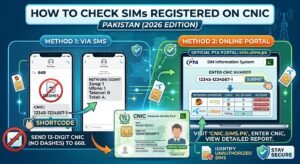
Method 1: SMS Check (Fastest, No Internet Needed)
- Open the messaging app on any mobile phone, on any network.
- Type your 13-digit CNIC number, with no dashes or spaces.
- Send the message to 668.
- Within a few seconds, you’ll receive a reply showing how many SIMs are registered under your CNIC, broken down by mobile operator.
This method works on any Pakistani SIM and from any network. Standard SMS charges apply (approximately Rs. 2 plus tax).
Method 2: Official Web Portal
Official website: https://cnic.sims.pk
- Open the official PTA portal linked above in any browser.
- Enter your 13-digit CNIC number (NICOP and POC numbers are also accepted for overseas Pakistanis).
- Complete the CAPTCHA verification.
- Submit the form to view your results, including a full operator-wise breakdown of registered SIMs.
This method works from anywhere in the world, making it especially useful for overseas Pakistanis who don’t have a local SIM handy.
Related Checks You Might Also Need
- Verify the SIM currently in your hand: Type “MNP” and send it to 667 to confirm the registered details of the specific SIM you’re holding — useful before linking it to a bank account.
- Check a number’s current network: Send “N” followed by the mobile number (e.g., N 03XXXXXXXXX) to 76367 for a small fee (approximately Rs. 2 plus tax) to confirm which operator a number currently belongs to, since numbers can move between networks through portability.
- Confirm biometric verification status: Different operators use different short codes for this — for example, sending your CNIC to 6001 on a Jazz connection confirms whether that specific SIM is fully biometrically verified.
What to Do If You Find an Unknown SIM
If your results show a SIM you don’t recognize or no longer use:
- Contact that mobile operator’s customer service directly and request that the SIM be blocked or disowned.
- If the operator doesn’t resolve the issue, file a complaint with PTA through its Consumer Support Centre at 0800-55055, available 9 AM to 9 PM, seven days a week.
- You can also file a complaint online at complaint.pta.gov.pk.
PTA has periodically reminded citizens to check the mobile connections registered against their CNIC regularly and disown any numbers they don’t actively use — a small habit that meaningfully reduces the risk of your identity being misused for fraud or unauthorized activity.
Staying Safe: Avoiding Scam “SIM Checker” Tools
This is an area where scams are unfortunately common. Fraudulent apps marketed with names like “Pak SIM Checker” have been found circulating via SMS and WhatsApp links, some containing malware designed to silently steal banking credentials, CNIC photos, and OTP codes while displaying fake SIM results. To stay safe:
- Only use the official SMS code (668) or the official web portal (cnic.sims.pk) — never a third-party app or website promising the same service.
- Never install an APK file sent via SMS or WhatsApp link claiming to be a “SIM checker” tool.
- Never share an OTP with anyone claiming to be from PTA or your network operator unless you personally initiated the request.
- Only provide biometric verification at an authorized mobile operator outlet — never at an unofficial roadside stall.
Frequently Asked Questions
Is checking SIMs on my CNIC free?
Yes, both the official web portal and the 668 SMS service are free or carry only a nominal SMS charge (approximately Rs. 2 plus tax).
Can I check how many SIMs are registered on someone else’s CNIC?
No. PTA’s official system only allows you to check your own CNIC. Attempting to access another person’s SIM registration details is illegal under PECA 2016.
How many SIMs am I allowed to register on my CNIC?
PTA has set limits on the maximum number of SIMs permitted per CNIC, which have been adjusted over time. Checking your current registered count through the official methods above will show you exactly how many are active under your name.
What should I do if I find a SIM I don’t recognize?
Contact the relevant mobile operator to have it blocked or disowned, and file a complaint with PTA at 0800-55055 or through complaint.pta.gov.pk if the issue isn’t resolved.
Checking the SIMs registered on your CNIC takes less than a minute through PTA’s official channels, and doing it periodically is one of the simplest habits you can build to protect your identity from misuse.
