


You open WhatsApp and find yourself in a group full of strangers. It might promise easy money, a job, a free gift, or a “crypto tip.” These groups are rarely harmless. If you are tired of unknown numbers adding you to WhatsApp groups, there is a setting that stops most of them in under a minute. This guide shows you how to change it, how to leave and report a group safely, and what extra steps keep scammers away.
Why Strangers Add You to WhatsApp Groups
By default, WhatsApp lets anyone who has your phone number add you directly to a group. Scammers collect numbers from leaked lists and random dialling. Then they add many people at once. Common goals include:
- Investment and trading scams.
- Fake job or “task” schemes.
- Phishing links and fake giveaways.
- Marketing and spam.
- Collecting phone numbers for later targeting.
Everyone in a group can generally see the other members’ phone numbers. That is one reason scammers like groups.
Step 1: Change Who Can Add You to Groups
The key setting is under Privacy. Follow these steps:
- Open WhatsApp.
- On Android, tap the three-dot menu and then Settings. On iPhone, tap the Settings tab.
- Tap Privacy.
- Tap Groups.
- Choose My contacts or My contacts except.
| Option | Who Can Add You Directly | Best For |
|---|---|---|
| Everyone | Anyone with your number | Not recommended |
| My contacts | Only people saved in your phone’s address book | Most users |
| My contacts except | Your contacts, minus the ones you exclude | Blocking a specific person who keeps adding you |
With My contacts selected, an unknown number cannot add you directly. The admin has to send you a private invite instead, and you can ignore it.
What the Setting Does Not Do
- It does not remove you from groups you already joined. You need to leave those yourself.
- It does not stop someone from sending you a group invite link. Joining through a link is always your choice, so do not tap links from strangers.
- It does not block your saved contacts from adding you, unless you exclude them under My contacts except.
WhatsApp has no option called “Nobody”. The closest method is to choose My contacts except and select all your contacts. Then no one can add you directly, and every group arrives as a private invite.
Step 2: Leave and Report the Group
If you are already in a suspicious group, leave it right away.
- Open the group chat. Do not reply or click any links.
- Tap the group name at the top.
- Scroll to the bottom and tap Exit group, then confirm.
- To report it, tap Report group instead. WhatsApp offers to exit the group as part of the report.
When someone adds you to a group you do not know, WhatsApp may show a safety overview, sometimes called a context card. It shows who added you, who made the group, when it was created, and the group description. This helps you decide to stay or leave. If the group looks unfamiliar, exit and report it.
Step 3: Block the Person Who Added You
Leaving one group does not stop the same person from adding you to another group. Block the sender, and then report the contact. If the person is in your contacts, use the My contacts except option to stop them from adding you in the future.
Step 4: Add More Layers of Protection
- Silence unknown callers: go to Settings, Privacy, Calls, and turn on Silence unknown callers.
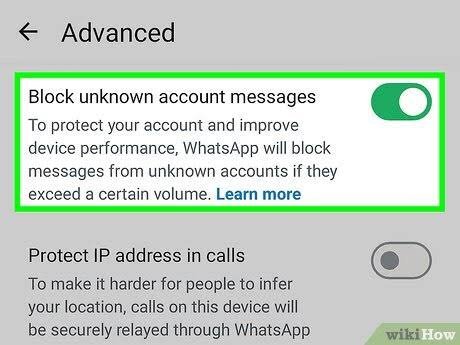
- Block unknown account messages: where it is available, you can find it under Settings, Privacy, Advanced.
- Two-step verification: turn it on under Settings, Account, so a scammer cannot take over your account.
- Hide your profile details: limit who can see your profile photo, About, and last seen under Privacy.
- Run the Privacy Checkup: WhatsApp has an in-app privacy checkup that walks you through these settings.
What to Do If You Already Clicked a Link or Shared Details
- Do not send any more money or information.
- If you shared a bank, wallet, or card detail, contact your bank or wallet provider right away.
- If you entered a code, log out of any unknown devices and enable two-step verification.
- Keep screenshots of the group, the numbers, and any payment proof.
- Report the scam to Pakistan’s cybercrime authorities. The National Cyber Crime Investigation Agency (NCCIA) helpline is reported as 1799. Confirm the number on the official website before you call.
How to Spot a Scam Group
- It promises quick, guaranteed profits or easy work-from-home pay.
- Members post fake screenshots of earnings.
- An admin pushes you to move to another app or to pay a “fee”.
- The group has many unknown numbers and no real discussion.
- You are asked for an OTP, a PIN, or a CNIC photo.
Never share an OTP, PIN, or password. No genuine company will ask for them on WhatsApp.
Tips to Stay Safe
- Review your privacy settings every few months.
- Save the numbers of people you trust, so the My contacts setting works for them.
- Do not join groups from random links or QR codes.
- Do not click on links inside unknown groups.
- Teach family members, especially parents, how to leave and report a group.
Frequently Asked Questions
How do I stop strangers from adding me to WhatsApp groups?
Go to Settings, Privacy, Groups, and choose My contacts or My contacts except.
Can I stop everyone from adding me?
There is no “Nobody” option, but choosing My contacts except and selecting all your contacts has the same effect.
Will changing the setting remove me from my current groups?
No. It only affects future additions. Leave existing groups yourself.
Can someone still send me a group invite link?
Yes. The setting does not block invite links, and joining a group by link is always your choice.
Should I report an unknown group?
Yes. Use Report group at the bottom of the group info page, and exit the group.
Conclusion
To stop unknown numbers adding you to WhatsApp groups, set Privacy, Groups to My contacts, leave and report any suspicious group, and block the sender. Add layers such as silencing unknown callers and enabling two-step verification. WhatsApp menus can change slightly between versions, so check the in-app options if you cannot find a setting. For more practical guides, keep following Pakistan Post. You can also read WhatsApp’s own help page on group privacy settings.
