


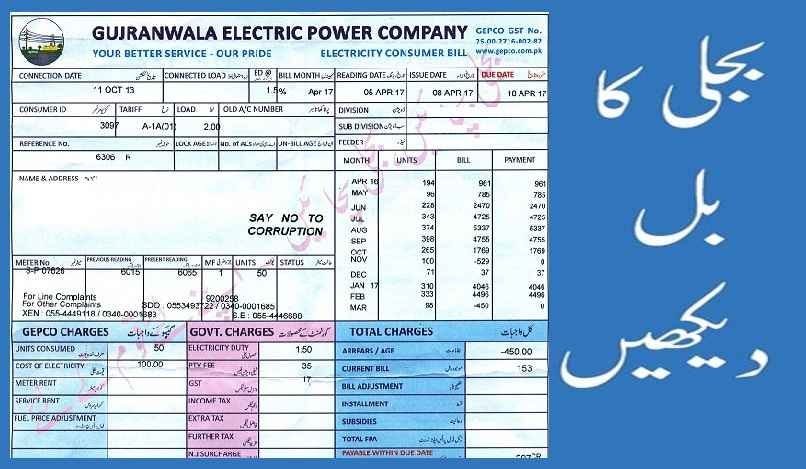
Lost your last paper bill and can’t find the 14-digit reference number anywhere? You’re not alone — it’s one of the most common reasons people get stuck trying to check or download their electricity bill online. The honest answer is that no official DISCO portal lets you search by just your name or address, for security reasons. But there are several legitimate ways to recover your reference number or get a copy of your bill without digging through old paperwork. Here’s how.
Why You Can’t Just Search by Name or Address
Every official electricity billing portal in Pakistan — including the unified PITC system used by WAPDA-linked DISCOs and K-Electric’s own platform — requires a reference or account number to pull up a bill. This isn’t a limitation; it’s a deliberate privacy safeguard so that anyone can’t look up a stranger’s electricity usage or billing details just by knowing their address. That means recovering your number is really a matter of checking the right place.
Method 1: Check Your Bank App or Mobile Wallet History
If you’ve ever paid an electricity bill through a bank app, JazzCash, or Easypaisa, this is usually the fastest fix:
- Open your banking app, JazzCash, or Easypaisa.
- Go to your transaction history or “Utility Bills” payment section.
- Look for a past electricity bill payment — the reference or consumer number is almost always saved alongside the transaction record.
- Copy that number and use it directly on the official billing portal to pull up your current bill.
Method 2: Check Old SMS or Email Confirmations
If you’ve paid a bill digitally before, or registered for e-billing with your DISCO, search your SMS inbox or email for past payment confirmations — these almost always include your reference or account number printed in the message itself.
Method 3: Use the QR Code on Any Old Bill
If you have even one old paper bill lying around — even an expired or already-paid one — recent LESCO, IESCO, and other DISCO bills include a QR code. Scanning it with your phone camera takes you directly to that connection’s billing page without needing to manually type the reference number.
Method 4: Visit Your Nearest Customer Service Center in Person
This is the most reliable method if digital options don’t work. Visit your local DISCO’s customer service or billing office, or K-Electric’s nearest Integrated Business Center (IBC) if you’re in Karachi, and bring:
- Your original CNIC
- Your property address matching the electricity connection
- Any old bill or payment receipt, if you have one, even if outdated
Staff can look up your account directly in their system using your CNIC and address, and provide your reference number or a duplicate bill on the spot.
Method 5: Call Your DISCO’s Official Helpline
Each distribution company maintains its own customer helpline for billing queries. Rather than searching online and risking an unofficial number, find your DISCO’s correct helpline printed on any old bill you may still have, or listed on your DISCO’s official .gov.pk website, and call to request your account details after verifying your identity over the phone.
A Word of Caution: Avoid Unofficial “Bill Checker” Websites
Searching online for ways to check your bill brings up dozens of third-party websites that are not affiliated with WAPDA, PITC, or any DISCO. These sites often ask for personal details and display ads aggressively, without actually connecting to official billing data. Stick to the official PITC billing portal, your DISCO’s own .gov.pk domain, or K-Electric’s official site and app — never enter your CNIC or personal information on a lookalike site promising instant bill downloads.
Frequently Asked Questions
Can I check my electricity bill using just my CNIC online?
No official DISCO portal currently allows bill lookup by CNIC alone — you still need a reference or account number. CNIC-based lookup is only available in person at a customer service center.
Is there a fee to recover my reference number at the customer service center?
No, retrieving your account or reference number at an official DISCO office is free.
What if I’ve moved into a new rented property and never had a bill?
Ask your landlord or the previous tenant for the reference number, or visit the local customer service center with your CNIC and tenancy proof to have the connection details looked up.
Can K-Electric customers use the same recovery methods?
Yes — bank apps, SMS/email history, QR codes on old bills, and visiting an Integrated Business Center in person all work the same way for K-Electric accounts in Karachi.
Once you recover your reference number through any of these methods, checking and downloading your bill going forward takes less than a minute on the official portal. It’s worth saving the number somewhere safe — a notes app or a photo of your bill — so you don’t have to repeat this process next time.
