


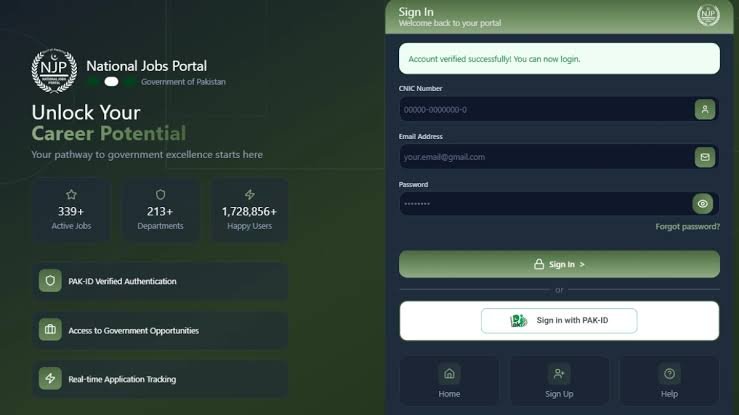
Your profile on the National Job Portal (NJP) is what government recruiters actually see, and an incomplete or outdated one can quietly cost you shortlisting even when you’re qualified. This guide explains how to update your National Job Portal profile, what to include, and how to keep it ready for new vacancies.
What Is the National Job Portal?
The National Job Portal (NJP) is the Government of Pakistan’s official platform for advertising and hiring for federal government jobs. Instead of applying through newspaper ads or physical forms, candidates register once, build a digital profile, and apply to any listed vacancy directly through the site at njp.gov.pk. As of late 2026, the portal lists jobs from over 220 government departments and has more than 2 million registered users.
Why Keep Your Profile Updated?
- Completing your profile is mandatory before you can apply for any job on the portal.
- Recruiters view your profile directly, so outdated details can mean a missed shortlisting even if you meet the criteria.
- Many listings require specific qualifications, dates, or experience. A profile that isn’t current can fail automated eligibility checks.
- An up-to-date profile saves time. You won’t need to re-enter your details every time you apply for a new post.
How to Update Your National Job Portal Profile: Step by Step
Step 1: Log In to Your Account
Go to njp.gov.pk and click Sign In. If you don’t already have an account, click Sign Up to register first using your CNIC, email, and mobile number.
Step 2: Open Your Profile or CV Manager
From your candidate dashboard, go to your profile section, sometimes labelled as the CV Manager or Resume Builder. This is where all your personal, academic, and professional details are stored.
Step 3: Review Your Personal Details
Check that your name, CNIC number, date of birth, contact number, email address, and domicile match your official documents exactly. Mismatches here are a common reason applications get rejected at the scrutiny stage.
Step 4: Update Your Educational Qualifications
Add or edit your degrees, starting from Matric onward. Include the institution name, degree title, major or specialization, year of completion, and your grade or CGPA. If you’ve recently completed a new degree, add it here so it appears when recruiters review your profile.
Step 5: Update Your Work Experience
List your current and previous jobs, with employer names, your job title, and the dates you worked there. Keep this current every time you change jobs or gain new experience, since experience-based filters are used for many posts.
Step 6: Upload or Replace Your CV and Documents
Upload a current CV, along with scanned copies of your CNIC, degrees, transcripts, and any experience letters. If you’re replacing an old document, make sure the new file is clear, legible, and in the format the portal accepts, usually PDF or JPEG.
Step 7: Update Your Photograph
If your profile photo is outdated, replace it with a recent, passport-style photograph, following the portal’s photo guidelines if shown.
Step 8: Save Your Changes
Once everything is updated, save your profile. Some sections may show a completion percentage. Aim to keep this as close to 100% as possible, since an incomplete profile can block you from applying to certain posts.
Common Mistakes to Avoid
- Leaving old job details unchanged after you’ve moved to a new role
- Mismatched names or CNIC numbers between your profile and your actual documents
- Uploading blurry or outdated scans of your degrees or CNIC
- Forgetting to add new qualifications as soon as you complete them, rather than right before you need to apply
- Using an old photo that no longer matches your CNIC picture
Tips for a Stronger Profile
- Update your profile as soon as something changes, such as a new degree, job, or contact number, rather than waiting until you see a vacancy you want to apply for.
- Use your full legal name exactly as it appears on your CNIC.
- Double-check dates for your education and experience, since these are often used to check eligibility automatically.
- Keep a digital folder of your scanned documents ready, so updates take just a few minutes.
- Check your registered email and phone number are both active, since NJP sends application updates and notifications to them.
What If You Face Technical Issues?
If you have trouble updating your profile, uploading documents, or logging in, you can contact NJP’s support team through the Help Desk on the website, by email at info@njp.gov.pk, or by calling the helpline at 051-9265411 or 051-9265062 during working hours (Monday to Friday, 8:30 AM to 4:30 PM).
Frequently Asked Questions
Do I need to complete my profile before applying for a job?
Yes. Completing your profile is mandatory before you can submit any job application on NJP.
How often should I update my NJP profile?
Update it whenever something changes, such as a new qualification, job, contact number, or address. Don’t wait until you see a job you want to apply for.
Can I update my profile after applying for a job?
You can generally update your profile at any time, but check whether changes made after submitting a specific application are reflected in that application, since this can vary by post.
What file formats does NJP accept for documents?
Most uploads accept PDF or JPEG files. Follow the exact format and size shown on the upload screen for each document.
What if I forget my NJP login details?
Use the “Forgot Password” option on the login page, or contact NJP support through the helpline or email if you’re still having trouble.
Keeping your National Job Portal profile complete and current takes just a few minutes, but it can make the difference between getting shortlisted and getting overlooked. Update it regularly, and it’ll be ready the moment the right vacancy appears.
