


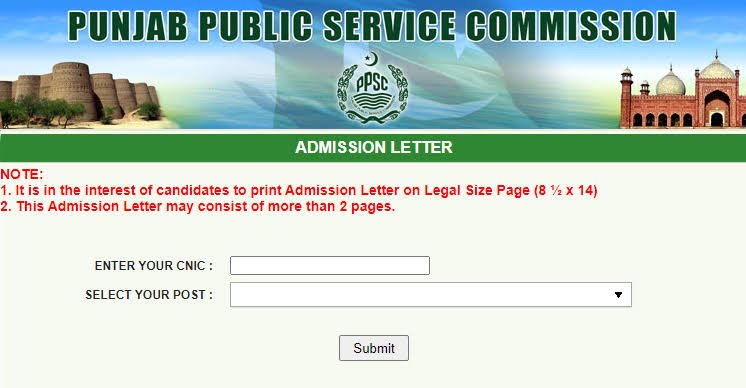
Got a test date from the Punjab Public Service Commission and need your roll number slip? You can download and print it yourself from home. This guide explains how to download your PPSC roll number slip, what it contains, and what to do if it isn’t showing up yet.
What Is a PPSC Roll Number Slip?
The PPSC Roll Number Slip, also called the Admission Letter, is the official document that allows you to enter a Punjab Public Service Commission screening test, written test, or interview. It’s mandatory; you cannot sit the exam or attend your interview without it, so you’ll need to bring a printed copy with you.
What’s on the Slip
- Your roll number
- Your CNIC number
- The post or position you applied for, along with the case/advertisement number
- Test or interview date, time, and venue
How to Download Your PPSC Roll Number Slip: Step by Step
Step 1: Go to the Official PPSC Website
Open your browser and visit www.ppsc.gop.pk, the official Punjab Public Service Commission website.
Step 2: Find the Roll Number Slip Section
Look for “Roll Number Slip,” “Print Admission Letter,” or a similarly labelled link, usually displayed prominently on the homepage once slips are available.
Step 3: Enter Your CNIC Number
Type in your 13-digit CNIC number, without dashes.
Step 4: Select Your Post or Case Number
Choose the specific post or case number you applied for, since you may have applied to more than one advertisement.
Step 5: Submit and Download
Click Search or Submit. Your roll number slip will appear as a downloadable PDF.
Step 6: Print It on the Correct Paper Size
Print your slip clearly. PPSC admission letters are commonly printed on legal-size paper (8.5 × 14 inches), though this can vary, so check the slip’s own formatting before printing, and bring a clean, legible copy with you.
Downloading by Name Instead of CNIC
If the CNIC search doesn’t bring up your slip, some PPSC search tools also let you look it up by name or roll number from an earlier test stage. Try this as an alternative if your CNIC search returns no result.
When Does PPSC Upload Roll Number Slips?
There’s no single fixed date each year. PPSC typically uploads roll number slips roughly 7 to 14 days before a test, timed around each specific exam’s schedule rather than a fixed annual calendar date. Keep checking the official website as your test date approaches, and watch for an SMS or notification from PPSC as well, since they often message registered candidates once slips are live.
Downloading Your Interview Admission Letter
If you’ve cleared the written or screening stage and are moving to the interview, a separate admission letter is issued for that stage. The process is the same: visit the official website, enter your CNIC or your earlier roll number, and download your interview letter, which will show your interview date, time, and the PPSC office address.
What If Your Slip Isn’t Showing Up?
- Check that you’ve selected the correct post or case number, since applying for multiple posts means each one has its own slip.
- Confirm PPSC has uploaded slips for your specific test yet. A missing result often just means it hasn’t been uploaded for your exam stage yet.
- Double-check your CNIC entry for typos, missing digits, or an accidental dash.
- Try the name-based search option if available, as a backup to the CNIC search.
- Contact PPSC directly through their official helpline or office if the issue continues close to your test date.
Tips for Test Day
- Print your slip a few days in advance, not the night before, in case the website is slow near the deadline.
- Bring your original CNIC along with your printed roll number slip, since both are typically required for entry.
- Double-check the test venue and reporting time printed on your slip, since these can differ between candidates even for the same post.
- Keep a digital copy saved on your phone as a backup to your printed one.
Frequently Asked Questions
Where can I download my PPSC roll number slip?
Through the official PPSC website at www.ppsc.gop.pk, using your CNIC number and selected post.
Is there a fee to download the roll number slip?
No, downloading and printing your roll number slip from the official website is free.
How many days before the test does PPSC upload slips?
Generally around 7 to 14 days before the scheduled test, though this isn’t fixed and depends on your specific exam’s timeline.
What should I do if my CNIC shows no result?
Confirm you’ve selected the correct post, double-check your CNIC digits, try a name-based search if available, and check again closer to your test date, since slips may not be uploaded yet.
Can I attend the test without a printed roll number slip?
No. The roll number slip is a mandatory document for entry into PPSC exams and interviews, so you’ll need a printed copy with you.
Downloading your PPSC roll number slip takes just a few minutes once it’s uploaded. Check the official website regularly as your test date approaches, and print your slip early so you’re not scrambling the night before.
