


To fix slow Wi-Fi at home without buying a new router, start with where the router sits, what is near it and how many devices share it. Move it to a central, open spot off the floor, away from metal, microwaves and baby monitors. Use the 5 GHz band when you are close to the router, keep older devices off the busiest times, and plug in an Ethernet cable for fixed devices such as a desktop or TV. Restart your network, and test your internet speed. If the result is below what you pay for, the problem is your internet service, not the Wi-Fi, so contact your provider. These tips come from Ofcom, Google Fiber and Google Nest help pages. Here are the fixes in order, what each one does and what I could not confirm.
Step 1: Check Whether the Problem Is Wi-Fi or Your Internet Plan
- Ofcom says your Wi-Fi cannot be faster than your broadband service. A slow plan means slow Wi-Fi however good the router is.
- Google’s Nest help page says to test your internet speed and, if the result is below what you expect, contact your internet service provider (ISP).
- Test close to the router first, then in the room where it is slow. If it is fast near the router and slow far away, the problem is signal, and the next steps will help.
Step 2: Restart Your Network
Google’s Nest page lists restarting your network among its steps. Ofcom’s page does not mention it. Unplug the router (and the modem, if you have one), wait about 30 seconds, plug it back in and wait for the lights to settle. This is a cheap first try. Google’s help pages for phones suggest waiting between 15 and 30 seconds.
Step 3: Move the Router to a Better Spot
- Central place: Ofcom and Google Fiber both say to place the router centrally so the signal reaches the main rooms.
- Off the floor: Google Fiber says to raise it on a table or shelf, at least 3 to 5 feet off the floor. Ofcom also says off the floor.
- In the open: Google Fiber says not to put it in a closet, cabinet or behind a TV unit. Keep the top, sides and front clear.
- Away from blockers: Ofcom says to keep it away from radiators, fish tanks, metal and glass. Brick internal walls weaken Wi-Fi more than hollow walls. Google Fiber says concrete, cinder block, brick and metal cause the worst blockage, while drywall, wood, thick glass and large mirrors weaken it moderately.
- Aerials: If your router has several, Ofcom says to point them in different directions.
Step 4: Keep Interference Away
- Ofcom says to keep the router away from microwaves, baby monitors, fairy lights and cordless phones.
- Google Fiber adds Bluetooth devices to the list of things that can disrupt the signal.
- Google’s Nest page says traffic on your network and on neighbours’ networks can also cause interference, and gives no specific fix.
Step 5: Use the Right Wi-Fi Band
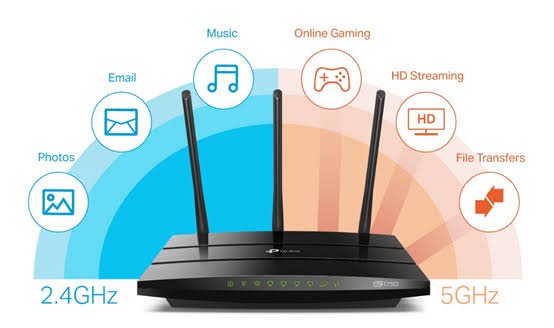
- Ofcom says lower frequencies reach further but are slower. Google’s Nest page says devices on 2.4 GHz may not reach the speeds of 5 GHz.
- In practice, join the 5 GHz network when you are near the router and the 2.4 GHz network when you are far away. This is general advice.
- If your router shows two network names, one is usually each band, but names vary. Check your router’s settings or manual.
- Ofcom says many routers pick the least crowded channel automatically and that some settings can be changed by hand. I did not find a safe, official step-by-step for changing channels, so I do not describe one.
Step 6: Reduce the Load
- Ofcom says bandwidth is shared, so fewer connected devices means better speeds for the rest.
- Pause big downloads, updates and video streams while you work or take a call. This is general advice.
- Disconnect devices you are not using.
Step 7: Use a Cable Where You Can
- Ofcom says a wired Ethernet connection is often faster and more reliable than Wi-Fi. Make sure the cable can handle your broadband speed.
- A desktop PC, a smart TV or a gaming console near the router is a good place to start. This is general advice.
- Moving fixed devices off Wi-Fi also frees up Wi-Fi for phones and laptops.
Step 8: Understand Your Old Devices
Ofcom, Google Fiber and Google’s Nest page all say that a device’s own Wi-Fi capability limits its speed. An older phone or laptop may be slow even when it is next to the router. This is a device limit, not a fault in the router.
Cheap Extras You May Already Have or Can Try
- Powerline adapters: Ofcom says they send data through your home’s electrical wiring and that results depend on the wiring. It lists prices in pounds from about £20, which will differ in Pakistan.
- Wi-Fi extenders or repeaters: Ofcom says they boost weak signals but can reduce speed and responsiveness. Google Fiber suggests placing one about halfway between the router and the dead zone, and using no more than two.
- These cost money, but less than a new router. Ofcom also lists a new router and mesh systems, which are outside the scope of this article.
What I Could Not Confirm
- Pakistani ISPs and routers. I did not check PTCL, StormFiber, Nayatel or other providers’ own advice, outage pages or router menus. Ask your provider about speed problems.
- The pound prices. They are from Ofcom’s UK page and do not apply in Pakistan.
- Changing the Wi-Fi channel. No official step-by-step was opened, so none is given.
- Google Fiber and Nest pages. They describe Google’s own products. I used only the general tips, not the product-specific ones such as the mesh test.
- How much each fix helps. None of the pages gives figures for a typical home.
- The Wi-Fi 6E, Wi-Fi 7 and 6 GHz details on Google Fiber’s page, which depend on a router and devices you may not have.
This is general information, not an official notice. Your internet provider is the final authority on your plan and service.
Frequently Asked Questions
Why is my Wi-Fi slow even though I pay for a fast plan?
It can be the signal (distance, walls, interference), too many devices, an old device, or the plan itself. Test your speed near the router first.
Where should I put my router?
In a central, open spot, raised off the floor and away from metal, glass, radiators, microwaves and baby monitors.
Is 5 GHz better than 2.4 GHz?
It is faster but reaches less far. Ofcom says lower frequencies reach further but are slower.
Does restarting the router help?
It is a cheap first try. Google’s Nest page lists it. Wait about 30 seconds before plugging it back in.
Will an Ethernet cable help?
Often yes. Ofcom says a wired connection is often faster and more reliable.
Do extenders fix slow Wi-Fi?
They can boost a weak signal, but Ofcom says they can reduce speed and responsiveness.
When should I call my internet provider?
When your speed test is below what your plan promises, even close to the router.
Test your speed before and after each change, so you know which fix worked.
