


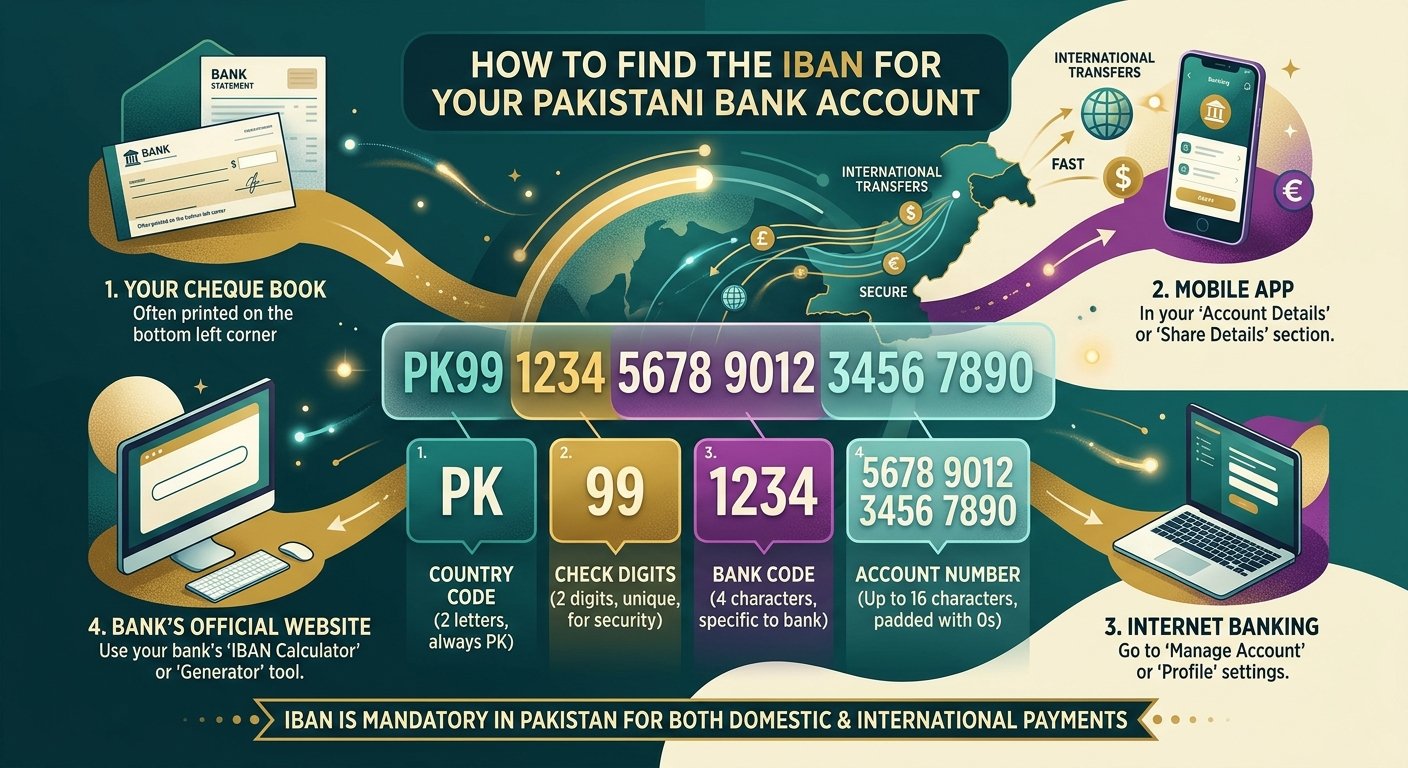
If someone asks you to share your bank details to receive money, you may need to provide your IBAN number. An IBAN is an important banking detail used for sending and receiving money in Pakistan and other countries.
Many people do not know where to find their IBAN or how it is different from their normal bank account number. The good news is that you can usually find it through your mobile banking app, bank statement, cheque book or your bank’s official website.
In this guide, you will learn how to find your IBAN number in Pakistan for banks such as HBL, UBL, Meezan Bank, MCB, Allied Bank, Bank Alfalah and other financial institutions.
What Is an IBAN Number?
IBAN stands for International Bank Account Number. It is a standard number used to identify a specific bank account when sending or receiving money.
In Pakistan, an IBAN contains 24 characters. It includes letters and numbers that identify the country, bank and account.
For example, a Pakistani IBAN looks like this:
PK36SCBL0000001123456702
This is an example only, not a real account number.
An IBAN helps banks identify accounts correctly and process payments more efficiently. It can be used for local bank transfers as well as international payments.
What Is the Difference Between an IBAN and an Account Number?
Your bank account number and IBAN are not the same. However, your existing account number is included as part of your IBAN.
| Feature | Account Number | IBAN |
|---|---|---|
| Meaning | Identifies your bank account | Identifies your account using an international standard |
| Format | Usually numbers only | Letters and numbers |
| Length | Depends on the bank | 24 characters in Pakistan |
| Use | Identifying your account within the bank | Local and international payments |
You do not need to open a new bank account to get an IBAN. Your bank provides an IBAN for your existing account.
How to Find Your IBAN Number in Pakistan
There are several easy ways to find your IBAN number. You do not necessarily need to visit a bank branch. Try these methods first.
1. Check Your Mobile Banking App
The easiest way to find your IBAN is through your bank’s official mobile application.
Follow these steps:
- Open your bank’s official mobile application.
- Log in using your banking details.
- Go to the Accounts or Account Details section.
- Select the bank account you want to use.
- Look for the IBAN or Account Information option.
- Copy your IBAN or use the available sharing option.
The exact steps may differ between banks and app versions. If you cannot find the IBAN, check your bank’s help section or contact customer support.
2. Check Your Bank Statement
Your bank statement is another reliable place to find your IBAN.
A bank statement contains important information about your account, including transactions, account details and sometimes your IBAN.
Follow these steps:
- Open your latest bank statement.
- Look near the account title or account number.
- Find the section labelled IBAN or International Bank Account Number.
- Copy the complete number carefully.
If you receive electronic bank statements, you can also download one through your bank’s official website or mobile application.
3. Check Your Cheque Book
Some Pakistani banks also print the IBAN on their cheque books.
Take a look at the information printed on your cheque book. If you find a number starting with PK, check whether it is labelled as your IBAN.
Not every bank prints the IBAN on its cheque books, so you may need to use another method.
4. Use Your Bank’s Official IBAN Generator
Some banks provide free IBAN generators on their official websites. These tools help customers find their IBAN by entering their existing account details.
For example, Meezan Bank and Askari Bank provide IBAN generation facilities on their websites.
Here are some official bank resources:
- Meezan Bank: Meezan Bank IBAN Generator
- Askari Bank: Askari Bank IBAN Generator and Validator
- Standard Chartered: Standard Chartered Bank Code Finder
- U Bank: U Bank IBAN Generator
Always use the official website of your bank. Enter the correct account and branch details if requested. Do not rely on an IBAN generated by an unknown website.
5. Visit Your Bank Branch or Call the Helpline
If you cannot find your IBAN through the methods above, contact your bank directly.
You can visit your nearest branch or call the bank’s official customer support number. Ask the representative to provide the IBAN for your account.
You may need to provide your account number and complete the bank’s identity verification process.
How to Find IBAN Numbers for Different Banks in Pakistan
Most Pakistani banks provide IBAN information through account statements, digital banking services or customer support. However, the exact process can be different for each bank.
Here is a quick guide for customers of some major Pakistani banks:
| Bank | Where to Find Your IBAN |
|---|---|
| HBL | Check your bank statement, digital banking services or contact HBL support. |
| UBL | Check your account statement or contact a UBL branch or helpline. |
| Meezan Bank | Use the official IBAN generator or check your bank statement. |
| MCB Bank | Check your account details, bank statement or contact MCB support. |
| Allied Bank | Check your account statement, digital banking or official website. |
| Bank Alfalah | Check your account details or use the bank’s official IBAN facility. |
| Askari Bank | Use the official IBAN generator or check your account statement. |
| Standard Chartered | Check your account statement or use its official IBAN facility. |
| National Bank of Pakistan | Check your account statement, digital banking or contact an NBP branch. |
Remember that the easiest method is usually to check your latest bank statement or mobile banking application.
How Many Characters Are in a Pakistani IBAN?
A Pakistani IBAN contains exactly 24 characters, including letters and numbers.
It has four main parts:
| Part | Characters | Purpose |
|---|---|---|
| Country Code | PK | Identifies Pakistan |
| Check Digits | 2 numbers | Helps verify the IBAN |
| Bank Code | 4 letters | Identifies the bank |
| Account Number | 16 characters | Identifies the bank account information |
For example, a Pakistani IBAN may look like this:
PK36 SCBL 0000 0011 2345 6702
Banks may display the number in groups of four characters to make it easier to read. When entering it into an online payment form, follow the instructions provided by the bank. Many forms require the IBAN without spaces.
Can You Find Your IBAN Using Your Account Number?
You may be able to generate your IBAN using your existing bank account number, but the process depends on your bank.
Some banks also require additional information, such as your branch code or other account details.
For this reason, you should not try to create an IBAN yourself by adding PK or your bank code to your account number. Use your bank’s official IBAN generator or ask the bank to provide the correct number.
Is It Safe to Share Your IBAN Number?
Yes, sharing your IBAN is generally safe when someone needs it to send money to your bank account.
However, you should follow some important safety rules:
- Share your IBAN only with trusted people or organisations.
- Never share your ATM PIN or mobile banking password.
- Never tell anyone your OTP (One-Time Password).
- Do not share your debit or credit card security code.
- Check the account title before confirming a money transfer.
- Use official banking applications and websites.
Your IBAN helps someone identify your account for a payment. It does not give them permission to access your online banking account.
Frequently Asked Questions (FAQs)
1. How can I find my IBAN number online in Pakistan?
You can find your IBAN through your bank’s mobile application, internet banking or official IBAN generator. You can also download your latest bank statement and check the account details section.
2. Is an IBAN the same as a bank account number?
No. An IBAN is different from a normal account number. It contains your existing account information along with a country code, check digits and bank code.
3. How many digits are in a Pakistani IBAN?
A Pakistani IBAN contains 24 characters, not 24 numbers. It starts with PK, followed by two digits, four letters and 16 account-related characters.
4. Can I receive money without an IBAN?
It depends on the payment method. For many bank transfers in Pakistan, the IBAN is used to identify the receiving account. Some other payment methods may allow transfers using a Raast ID, mobile number or other account details.
5. Does every bank account have a separate IBAN?
Yes. Each bank account has its own IBAN. If you have accounts in different banks or multiple accounts in the same bank, each account will have a different IBAN.
6. Can I find my IBAN on my ATM card?
Usually, no. An ATM or debit card number is different from an IBAN. Check your bank statement, mobile banking application or official bank website to find your IBAN.
7. Can I use my Pakistani IBAN to receive international payments?
Yes. Pakistani IBANs can be used for international bank transfers. However, the sender may also need your account title, bank name, SWIFT/BIC code and other information depending on the country and payment service.
8. What should I do if my IBAN is not working?
First, check that you have entered all 24 characters correctly. Remove spaces if the payment form does not accept them. If the problem continues, contact your bank and ask it to verify your IBAN.
Conclusion
Finding your IBAN number in Pakistan is simple. You can check your mobile banking application, download your bank statement, look at your cheque book or use your bank’s official IBAN generator.
If you cannot find it, contact your bank or visit the nearest branch for assistance. Always use the correct IBAN when receiving or sending money, and never share your banking password, PIN or OTP with anyone.
